A desktop companion

iPet

A small dog walks along the bottom of your screen. Its journey is your working hour.

No timers. No pop-ups. No notifications. Just a dog that knows when you should look away.

The Idea

A Tamagotchi that looks after you.

Every tool built to protect your attention does it by interrupting you — a countdown in the corner, an alarm at :25, a banner that slides in while you are mid-sentence. The cure borrows the disease.

In the late nineties a plastic egg taught a generation to keep something alive: feed it, clean up after it, check on it before class. iPet borrows that feeling and turns it around. The creature is the one doing the looking after.

It has no hunger bar and nothing to lose. It just walks, and you glance down and know roughly where you are in the hour. Nothing is measured at you. Nothing asks to be dismissed.

How it works

One hour, told as a walk.

1
Walks, slowly, from the left edge
Work
2
At 20 minutes, stops to play with a ball
Look at something far away, twenty seconds
3
Resumes the walk; the ball returns once more
Two more segments
4
At 60 minutes, reaches the far edge, sits, wags its tail
Ten minutes away from the screen
5
Walks back to where it started
A new hour begins

This is the 20-20-20 rule — every twenty minutes, look twenty feet away for twenty seconds — rebuilt as something you feel rather than read.

Details

The whole interface is one line in the menu bar.

The iPet menu bar item: a small dog silhouette beside a running timer reading 0:00:56

No window, no dock icon, no dashboard. A small dog and a running clock — the time you have been at this stretch. When a break starts the number turns around and counts down instead, so a glance tells you which side of the hour you are on.

Everything it does fits in one menu.
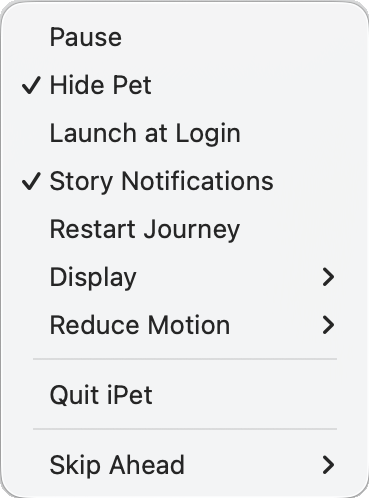
The iPet menu: Pause, Hide Pet, Launch at Login, Story Notifications, Restart Journey, Display, Reduce Motion, Quit iPet, Skip Ahead

Pause the journey. Hide the dog and keep the clock running. Choose which display it walks on. Follow the system's reduce-motion setting, or override it in either direction. Nine items, no preferences window, nothing to configure before it works.

It tells you where it has been.

The hour is not abstract. The dog is on a journey with five chapters — Setting Out, The Woods, The Stream, The Foothills, The Way Home — and every break comes with a line about where it has got to. A butterfly by the path. A stream. A small rainbow on the water. Five chapters is five hours; then a new journey begins.

The rest reminder lives inside the story rather than on top of it. Story lines currently ship in Chinese.

Principles

What it refuses to do.

Never interrupt.

No modal, no sound, no window that steals focus. If the dog needs to tell you something, it changes what it is doing.

Calm at every frame.

Animation eases; nothing snaps, bounces, or flashes. A companion that startles you is worse than no companion.

Health before productivity.

iPet does not track output, count tasks, or score your day. It has one job: your eyes.

These are binding. A feature that conflicts with them is rejected, not negotiated.

Under the hood

Built the way I write.

iPet is a Tauri application — a native macOS overlay with a TypeScript rendering layer that draws the dog frame by frame from sprite sheets.

It was built documentation-first: nineteen specification documents, each the single source of truth for the behaviour it describes. Changing what the dog does means changing a document first. 293 unit and integration tests keep the state machine honest.

Tauri + TypeScript
19 spec documents
293 tests passing
Version 1.0.0

Status

Version 1.0, quietly.

iPet 1.0 runs on macOS. It is in private testing while I watch how it behaves across long working days. If you would like to try it, or you are building something in this space, write to me.